'사실 수집'과 관련된 글(아직 안읽어 봄 ㅎㅎ)
52-85페이지(4장)까지
1. 책에서 제일 좋았던 부분 자신의 코멘트를 더해 공유하기
2. 토론하고 싶은 질문 한가지씩 준비해서 미리 톡에 공유하기
피셔의 '사실수집'이 영어로는 scuttlebut인데 관련 글
https://medium.com/@miguelmota/getting-started-with-secure-scuttlebut-e6b7d4c5ecfd
Getting Started with Secure Scuttlebutt (SSB)
Feb 24, 2019
Scuttlebutt was started in May 2014 by Dominic Tarr (dominictarr) as an alternative offline-first invite-only social network that allows users to gain total control of their data and privacy. Secure Scuttlebutt (ssb) was released shortly after which puts privacy at the forefront with more encryption features.
If you’re wondering where the heck the name Scuttlebutt came from:
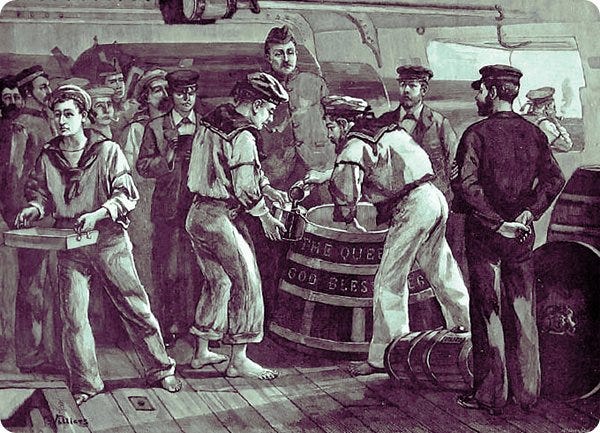
This 19th century term for a gossip comes from the nautical Scuttlebutt: “a barrel of water kept on deck, with a hole for a cup”. The nautical slang is from sailors’ habits of gathering by the scuttlebutt to gossip, akin to watercooler gossip.
Sailors gathering around the scuttlebutt. (source)
Dominic came across the term scuttlebutt from a research paper he read.
In distributed systems, gossiping is a process for relaying messages in peer-to-peer fashion; messages get spread around analogous to “word of mouth”.
Secure Scuttlebutt is a database of immutable append-only feeds, optimized for efficient replication for peer-to-peer protocols. Every user has an append-only immutable log that they can write to. They write to the log by signing messages with their private key. Think of a user feed as their own logbook, like a ship’s log (or Captain’s log for those Star Trek fans), where they’re the only one’s allowed to write to it, but have the ability to allow other friends or colleagues to read to their logbook if they so wish so.
Each message has a sequence number and the message must also reference the previous message by its ID. The ID is a hash of the message and signature. The data structure resembles that of a linked-list. It’s essentially an append-only log of signed JSON. Every item added to a user log is called a message.
The user logs are known as a feed and a user can follow other user feeds to receive their updates. Each user is responsible for storing their own feed. When Alice subscribes to Bob’s feed, Bob downloads the feed log from Alice. Bob can verify the feed log actually belongs to Alice by verifying the signatures. Bob can verify the signatures by using Alice’s public key.
High-level structure of a feed
Pubs are relay servers known as “super peers”. Pubs connect users users and gossip updates to other users connected to the Pub. A Pub is analogous to a real-life pub where people go to meet and socialize. To join a Pub the user must be invited first. A user can request an invite code from a Pub; the Pub will simply generate a new invite code, but some Pubs might require additional verification in the form of email verification or with some Pubs you must ask for a code in a public forum or chat. Pubs may also map user aliases such as emails or username to public key ID’s to easier reference peers.
After the Pub has sent the invite code to the user, the user will redeem the code which means that Pub will follow back the user which allows the user see messages posted by other members of the Pub as well as have the Pub relay messages by the user to other members of the Pub.
Besides relaying messages between peers, Pubs can also store the messages. If Alice is offline and Bob broadcasts a feed updates, then Alice will miss the update. If Alice goes online but Bob is offline then there’s no way for her to fetch Bob’s feed. But with a Pub, Alice can fetch the feed from the Pub even if Bob is offline because the Pub is storing the messages. Pubs are useful because as soon a peer goes online they can sync up with the Pub to receive the feeds of their potentially offline friends.
A user can optionally run their own Pub server and open it to the public or only allow only their friends to join if they wish. They can also join a public Pub. Here’s a list of public Pubs anyone can join. We’ll explain how to join one later in this guide. An important thing to note is that Secure Scuttlebutt in an invite-only social network meaning you must be “pulled-in” to join social circles. If you respond to messages, the recipients will not be notified unless they are following you back. A goal of SSB is to create isolated “islands” of peer networks, unlike a public network where anyone can message anyone.
Perspectives of participants
Scuttlebot
The Pub software is known as the Scuttlebutt server (ssb-server) but is also referred to as “Scuttlebot” and sboton the command-line. The SSB server adds networking behavior to the Scuttlebutt database (SSB). We’ll be using Scuttlebot through out this tutorial.
Getting familiar with the CLI
We’ll start out by using the CLI for publishing messages to our feed to get our feet wet. Install the npm package scuttlebot globally to access the sbot CLI:
$ npm install -g scuttlebot
Now we’ll start a local Pub server. The Pub is responsible for storing our messages. Run the sbot server command to start a local Pub (relay server):
$ sbot serverscuttlebot 13.2.2 /Users/mota/.ssb logging.level:notice
my key ID: OKcgAu1yl8qf+i3tCj5jFBkwPApN0/+vEkq0aGR9mjQ=.ed25519
This generate a new Ed25519 key pair that is used as your identity. A user identity is also called a feed ID and are used for subscribing to feeds. Identity secrets are stored in the location~/.ssb/secret:
$ cat ~/.ssb/secret# this is your SECRET name.
# this name gives you magical powers.
# with it you can mark your messages so that your friends can verify
# that they really did come from you.
#
# if any one learns this name, they can use it to destroy your identity
# NEVER show this to anyone!!!{
"curve": "ed25519",
"public": "OKcgAu1yl8qf+i3tCj5jFBkwPApN0/+vEkq0aGR9mjQ=.ed25519",
"private": "[REDACTED]...........................................................................A==.ed25519",
"id": "@OKcgAu1yl8qf+i3tCj5jFBkwPApN0/+vEkq0aGR9mjQ=.ed25519"
}# WARNING! It's vital that you DO NOT edit OR share your secret name
# instead, share your public name
# your public name: @OKcgAu1yl8qf+i3tCj5jFBkwPApN0/+vEkq0aGR9mjQ=.ed25519
Each user has an asymmetric private-public key pair. The user’s public key ID starts with the @ symbol. Keys and hashes are base64 encoded.
Private keys and hashes will have a tag append to the string, such .ed25519 to denote that it used the Ed25519 algorithm for the public-private key system and you’ll see .sha256 for content hash IDs. An example private key looks like this:
ZAO3BHvpYzXISgLlsbLUGp3CGCXaBmdvEMy2gLdXxyFBDRztv0szhQWUz5Ah44gk+BTC3KjYQH50usXiT3JofQ==.ed25519
Use the whoami command to display the public identity currently being used:
$ sbot whoami{
"id": "@OKcgAu1yl8qf+i3tCj5jFBkwPApN0/+vEkq0aGR9mjQ=.ed25519"
}
We know who we are now, so let’s publish a message post. Use the sbot publish command to post a new message using the CLI:
$ sbot publish --type post --text "Hello, world"{
"key": "%UQkdk9g5Mw62do5/PCiStnyclq2Dhi1NhUe/IzbBik8=.sha256",
"value": {
"previous": null,
"sequence": 1,
"author": "@OKcgAu1yl8qf+i3tCj5jFBkwPApN0/+vEkq0aGR9mjQ=.ed25519",
"timestamp": 1550907704334,
"hash": "sha256",
"content": {
"type": "post",
"text": "Hello, world"
},
"signature": "dFGH/TyVsuipIYiPsYGql5sAcAypDUldEIeLRphTOz3G+Kb5lyqpFwf6KlcbX5SZcJlMzJKflHarpchiClKjBQ==.sig.ed25519"
},
"timestamp": 1550907704335
}
This generates a new message. Message IDs start with the % symbol. Because this is the first message (known as the genesis) it doesn’t reference a previous message.
When the user publishes a second post, we can see that it references the previous message ID and the sequence nonce is incremented.
$ sbot publish --type post --text "Hello, mars"{
"key": "%X/ge1np2pJPsPs1F4t5C8mj4VmeGX2jkkJFdlj+s/5o=.sha256",
"value": {
"previous": "%UQkdk9g5Mw62do5/PCiStnyclq2Dhi1NhUe/IzbBik8=.sha256",
"sequence": 2,
"author": "@OKcgAu1yl8qf+i3tCj5jFBkwPApN0/+vEkq0aGR9mjQ=.ed25519",
"timestamp": 1550981145641,
"hash": "sha256",
"content": {
"type": "post",
"text": "Hello, mars"
},
"signature": "HACmQOWZl6AMEsv++Co/SPcPa2GI4YIRiSDeir6rPI6Lyawvq80C65N/u2LaImLf7GIgQKalqXESEYBbFh1bCA==.sig.ed25519"
},
"timestamp": 1550981145642
}
All messages added to the user feed log are signed. The signature is used to derive the signing public key to verify the actual signer.
List a user’s feed referenced by their public key ID:
$ sbot createUserStream --id @OKcgAu1yl8qf+i3tCj5jFBkwPApN0/+vEkq0aGR9mjQ=.ed25519{
"key": "%UQkdk9g5Mw62do5/PCiStnyclq2Dhi1NhUe/IzbBik8=.sha256",
"value": {
"previous": null,
...


![[펌] 출처 미상 작자 미상](https://image.fmkorea.com/files/attach/new5/20250425/8295412122_192159903_34675b04486b9c815eeb7484746278c2.png)